
Mementom FAQ
Your questions, answered.
Getting started, sharing on your terms and making the most of Mementom.
Browse all questions below.
Getting started
What do I get from using Mementom?
Personalization. Without identity. Mementom connects people and companies so your tastes, interests and activity can make experiences more relevant, while you control what you share.
Browse partner sites like normal. Come back to the app for your data, your choices and opportunities to engage. Learn how earning works and what is available now.
Link to this answerHow do I get started with a photo and a caption?
On a partner site or the Mementom website, click or scan the badge where it says to create or use a key. Create a simple key using a photo of your choice and the caption it inspires. Mementom never asks for your identity.
Choose a digital photo; you do not need a printed picture. Setup opens in a separate secure Mementom window. One key is enough to get started.
Link to this answerI already have a key. How do I use it?
Open the Mementom app and choose Use existing keys. At a partner’s badge, choose to use your existing key.
If you opened Get started by mistake, choose Already have a key? in the secure window. You do not need to create another key.
Link to this answerWhat changes as I browse a partner’s site?
After you connect, browse like normal. With the permissions you allow, the company can add insights from non-identifying activity, such as interests, clicks or time spent looking at something. Those insights can make later experiences more personal.
What changes depends on the partner’s integration. You do not have to fill out a profile before browsing.
Link to this answerWhat will I find in the Mementom app?
The Mementom app is where you return to manage your keys, review insights and data packs, and see saved cards. Discover is the place for offers, questions and requests for relevant data as those services become available.
Use the side menu for My keyring, Insights or Data packs. You choose what to engage with and what to ignore.
Link to this answerDo I need a new key for every company?
No. One key is enough to start, and you can use it across participating sites and apps. Companies receive fresh, temporary sessions, not a shared identifier for your keys.
You can add personal keys later if you want. Some protected actions or recovery options can require more than one key; the secure window explains what that request needs.
Link to this answerCan I use Mementom on any website?
The site or app needs to support Mementom. Look for its Mementom badge. A key does not automatically grant access to every service or protected action; the participating company defines the access it offers.
Link to this answerEarning and opportunities
What would I agree to before a paid engagement?
A paid opportunity needs to tell you what action qualifies, what data the company would receive and what you would earn before you agree. A visit, completed answer, data release and purchase are different outcomes; a click alone does not establish all of them.
Seeing an opportunity does not mean you have accepted it or released your data.
Link to this answerDo I have to accept offers or share data?
No. Click on what you want. Ignore the rest. You can keep using your keys and managing your data without accepting a paid opportunity, answering a question or agreeing to release data.
Link to this answerHow and when can I receive payment?
Payment methods, timing and eligibility depend on the terms of the opportunity. For questions about payment, contact partners@mementom.app.
Sample cards and campaign previews do not earn money.
Link to this answerDoes getting started cost anything?
Creating a personal key does not ask for payment details. Taking part in paid opportunities is optional. Purchases or subscriptions you choose directly from a company have that company’s own prices and terms.
Link to this answerWhy do I see no opportunities, or cards marked Sample?
What you see depends on the available content and your sharing choices. An empty view does not mean your key is broken.
Sample marks demonstration content. It does not represent a live paid opportunity, and sample insights do not qualify you for a live audience or earnings.
Link to this answerWhat is Anyfluencer?
Anyfluencer is a way for anyone to help grow Mementom by introducing people or encouraging companies to join. You do not need a large following.
The program is designed to reward you when the people or companies you help bring in generate qualifying engagement. Referring someone does not give you access to their keys, identity or private data.
Link to this answerHow do Anyfluencer referral rewards work?
Referral rewards depend on the program’s qualifying activity and payment terms. Contact partners@mementom.app for details.
A referral invitation is different from sharing an access key. Giving someone a shared key does not automatically count as a referral or earn a reward.
Link to this answerYour data and privacy
What are data packs?
A data pack groups useful details you choose to keep, such as shirt or pants measurements, shoe size, colors and style, food preferences or the kinds of food in your refrigerator.
Other packs cover home and furniture fit, pets, beauty preferences, sports gear, travel, devices and cooking. These details can help a company understand what fits your life without needing your identity.
Link to this answerHow do I fill in or correct a data pack?
In the Mementom app, open Data packs from the side menu. Enter the details you want to keep and review them before saving. You can edit or remove individual values later.
Where supported, imports or capture can suggest matching details for you to review. Photo and video analysis depend on availability; a picture is not a guarantee of exact measurements or a complete inventory. Time-sensitive information can expire and stop being used for current audience matching.
Link to this answerDoes saving my data automatically give it to a company?
No. New personal data-pack values are private by default. Choosing Share for an eligible personal insight allows it to help match you to an audience; it does not send that value to the company.
Releasing data to a company is a separate choice that requires your approval. Activity a company contributes from its own site has its own company-specific sharing controls. Sharing a key with another person is a different action again.
Link to this answerCan the same data be used for more than one opportunity?
You can keep and update useful data instead of entering it again each time. With your permission, current eligible insights can help match more than one audience.
Review the recipient, use, duration and payment terms before agreeing to a data opportunity. Saving a data pack does not enroll you in a subscription.
Link to this answerCan I stop sharing or delete an insight?
Review an insight’s sharing controls in the app and choose Don’t share to stop using it for future audience matching. Data packs also let you edit or remove individual values. Review company connections and their permissions in My keyring.
Stopping future sharing does not recall data a company already received, delete its own records or erase Mementom’s required activity history.
Link to this answerWill a company get my identity or contact me outside Mementom?
Mementom does not ask for your name, phone number or an email tied to your identity to create a personal key, and using that key does not give those details to a company. Permitted opportunities can reach you in Mementom or through its identity-free email. You control the Email service key and inbox filters.
If you separately identify yourself to a company, such as by placing an order with a delivery address, that company can use the information under its own relationship with you. Mementom does not erase information you already gave it or control its own email and phone systems.
Link to this answerDoes a company receive my photo, caption or key file?
No. Real key creation, verification and management happen in the separate secure Mementom window. The company receives a temporary session and the result of its request, not your private photo, caption, keyring identifier or file.
Link to this answerCan companies match me using my Mementom sessions?
Mementom does not supply a common keyring identifier to companies, even when one company operates several apps. Sessions are random, temporary and limited to their app.
This does not prevent companies from connecting information you give them directly or collect through their own sites.
Link to this answerDoes Mementom make everything I do online anonymous?
No. Mementom lets you use keys and share permitted context without handing over your identity through Mementom. It is not a VPN and does not replace your browser’s privacy controls.
Companies’ own data collection remains separate. The Privacy page explains Mementom’s service records, network processing and retention.
Link to this answerSharing a key
How are shared digital keys different from physical keys?
A physical key usually opens the same lock for whoever holds it. A Mementom shared key has access you can change: what it opens, when it works and which permitted actions it can perform.
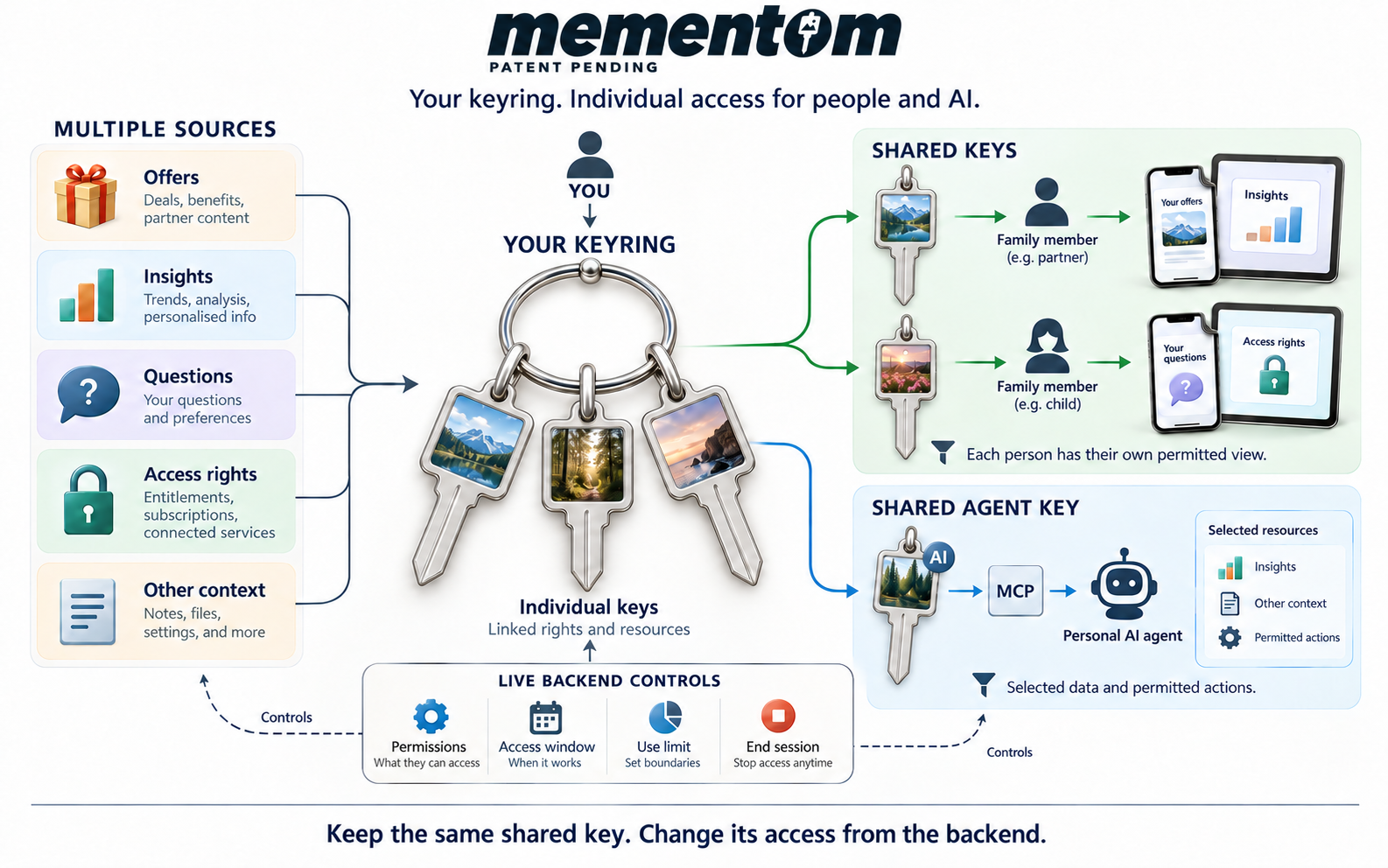
Your keyring brings together offers, insights, questions and access rights from participating sources. A shared key gives someone a selected view of that keyring. It does not hand over your personal keys or the whole ring.
You can give a partner access to selected offers and insights, while another family member has different permissions. Issue separate shared keys when you want to control their access separately.
Keep the same shared key. Change its access from the backend. In shared-key management, you can change permissions, set an access window or use limit, and pause or end access. The recipient’s existing key follows the current settings, so you do not need to send a replacement file for each change.
Open My keyring, choose Sharing → Share a key, then choose a Guest key for a person or a Service key for Email, Personal Agent or Marketing Agent. The private steps open in the protected Mementom window.
Link to this answerCan Mementom provide an anonymous email address?
Yes. No email tied to your identity. Mementom gives your keyring a generated mailbox address for permitted campaign messages. You do not need to provide an identifying email address to use it.
Choose Service key → Email from My keyring → Sharing → Share a key. In the secure window, create the mail app settings and use the address, username, password and server details shown to add the mailbox to a compatible mail app, such as Apple Mail.
The mailbox receives campaign messages. Sending and replies are unavailable. In Manage shared keys, open the Email key to control its permissions and access, renew mail app settings when needed, or block companies and campaigns with Inbox filters.
Link to this answerWhat is a shared personal agent key?
A Personal MCP key lets your personal AI agent work with the parts of your keyring you choose. It can find available offers, help with questions and read permitted insights through Mementom’s MCP connection.
You choose what the agent can read and which supported actions it can take. Reading and changing information are separate permissions, and available filters can narrow the records it receives. Your agent does not gain access to your whole keyring or permission to manage your personal keys.
You stay in control after connecting. Mementom checks the current settings on each request. You can change the shared key’s permissions while the agent stays connected; it does not need a replacement key or a reinstalled connection to follow those changes. It cannot grant itself additional rights.
You can also control the key’s access window, use allowance and session lifetime. These are separate settings: extending the key’s access window does not extend an already issued session. For Personal MCP, the use allowance counts supported successful changes, not reads or rejected requests.
Choose Service key → Personal Agent from My keyring → Sharing → Share a key. See the Personal MCP guide for supported tools and connection options.
Link to this answerCan my family reuse the same sharing QR code?
Yes. The same QR code or link can be used by more than one recipient while pickup and the shared key remain available. Each person collects the same issued shared key and saves its file.
Everyone using that key shares its permissions, expiry and successful-use allowance. For separately controlled access, issue separate shared keys.
Link to this answerWhere can I find the sharing QR code again?
Open My keyring in the app, open the shared-key management list and choose the shared key. Its available pickup link and QR can be opened again.
If an older transfer no longer has a stored file, the secure flow may ask for the original shared-key ZIP or a saved file containing it before pickup can be restored.
Link to this answerDoes a pickup timeout mean the shared key has expired?
No. A recipient’s individual pickup session can time out; they can reopen the reusable link to start again. That is separate from the key’s expiry and use limits.
The encrypted pickup file is retained for reuse until the issuer deletes or revokes it. Paused, expired, exhausted or deleted keys can prevent pickup or use.
Link to this answerCan I see the caption and image of a key I issued?
Authorized shared-key management can show the issued caption and settings. The image can come from saved key material available on that device; if it is missing, the secure flow can ask for the file that contains it.
Reusable pickup stores an encrypted shared-key file. That is separate from giving connected companies access to your private key material.
Link to this answerPersonal agents
How does my personal agent represent me?
Your personal agent is the AI you choose to work toward your goals. Mementom lets you give it controlled access to selected parts of your keyring, so it can help you find relevant offers and make informed choices.
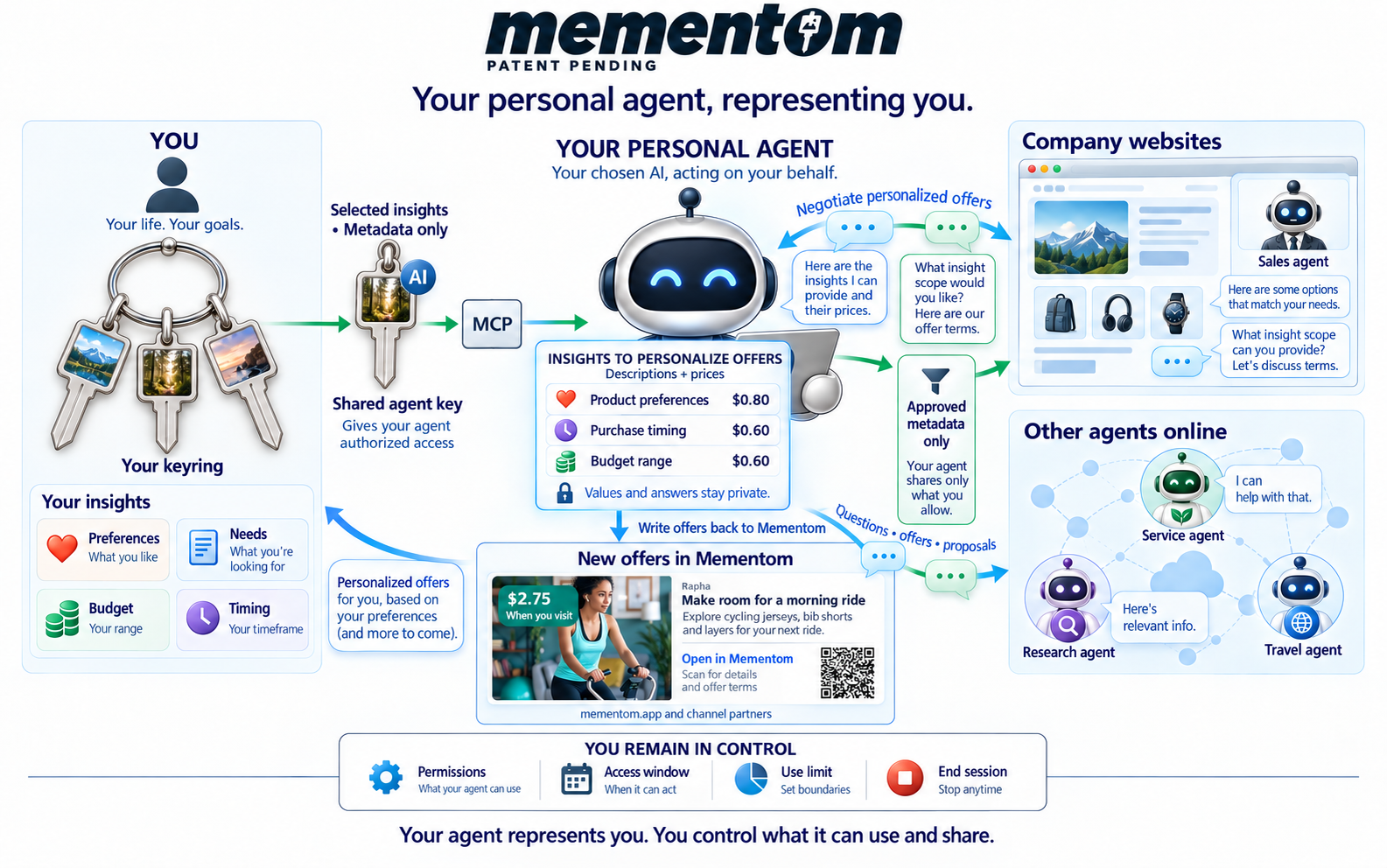
Your goals guide the conversation. Preferences, needs, budget and timing help your agent understand what matters to you. A Personal Agent Key connects it through MCP, the connection your AI uses to work with Mementom. You choose its permitted access.
Insight descriptions are separate from private values. The diagram shows metadata: what an insight describes and its stated price. Discussing that description does not authorize sharing the underlying value or answer. You decide what may be shared and whether the offered terms are worthwhile.
Your agent brings choices back to you. When discussing options with a company’s sales agent or another online agent, it should use only the context you authorize. It can help compare offers, questions and proposals against your goals. Review each offer’s terms before choosing to act; finding an offer does not accept it.
Offers available through Mementom can be reviewed in the app or with your connected agent. The diagram brings that conversation back to Mementom, keeping the offer and its terms together for your decision.
You remain in control. Set the shared key’s permissions, access window and use limit. Change its access or end the agent’s session when needed. The agent cannot grant itself more access.
For connection and permission details, see What is a shared personal agent key?
Link to this answerFiles and devices
What is my keyring and its backup file?
Your keyring holds your personal keys and the access connected to them. Its saved file is an encrypted ZIP containing your key images. Keep the ZIP intact; your password or authenticator still protects access.
A single shared-key ZIP holds only the issued shared key, with its own caption and limits. It is not a backup of your personal keyring.
Link to this answerIs the copy saved in my browser a backup?
No. A browser copy saves you selecting a file again, but clearing site data, changing browsers or losing the device can remove it. Keep a current backup somewhere you control.
Link to this answerWhen should I save a new backup?
Save the updated file when the secure flow offers it after changing your keys or saved shared-key records. Use the current copy on your other devices. An older file may not contain your latest images or changes.
Link to this answerHow do I use my key on another device?
Transfer your saved keyring ZIP safely to the other device, open the Mementom app in a supported browser, choose Use existing keys and complete the verification shown. A file made on a Mac can be used in a supported phone browser.
A shared key can instead be collected through its pickup QR or link. Keep its caption separate from the file.
Link to this answerCan I use a private window or turn cookies off?
A private or incognito window may discard saved files and sign-in state when you close it. Keep your backup and be ready to open it again.
Mementom does not use third-party advertising cookies on its public site. Current secure flows do use necessary session cookies and browser storage, so blocking all cookies or storage can interrupt them. This is different from turning off advertising trackers.
Link to this answerUsing your keys
What happens when a company asks me to approve an action?
A separate secure Mementom window shows who is asking and what they want. Review the request, open your keys and answer the selected photo’s caption prompt.
The company receives a result limited to that request. A successful sign-in does not automatically approve every later protected action.
Link to this answerWhich key will I be asked to use?
With one eligible personal key, you use that key. If you have several, Mementom can select an eligible one at random. The secure window shows its photo so you can enter the caption it inspires.
Link to this answerDo I need to sign in to shop at Harbor?
You can browse, search and compare products without connecting. To save items, place a buy-now order or open My activity, connect your keyring through the Mementom badge. You do not need a separate Harbor account.
Private auctions and bidding have their own permissions.
Link to this answerWhat does Harbor’s QR badge connect?
The badge links your existing personal keyring to the Harbor visit already open in your browser. You need one eligible personal key, without a Harbor invitation or a previously granted Harbor login permission.
Check the company and domain shown, then scan the QR code and complete the secure Mementom steps. Open the badge menu for a larger code. The badge shows Session connected after the connection is confirmed.
To stay on the same device, choose Continue on this device in the badge menu. If the code expires, click the badge to renew it. A fresh code opens directly.
Connecting does not grant insight-sharing, private-auction or bidding permissions. To end the connection, click the connected badge and choose Disconnect in the Activity window. Public browsing stays open.
Link to this answerHow can I see what Harbor saves to my keyring?
Click the connected Mementom badge to open the Activity window. It shows the current session, activity from your earlier connected visits on this site, and which insights reached your keyring. Use Pause activity to stop new recording while staying connected. Open the sharing controls to manage saved items and your preference for new activity. Use Disconnect at the bottom to end the connection.
Shopping actions such as viewing a product, saving it, comparing items or placing a bid or order update useful shopping insights. Leaving the page open or refreshing the panel does not create repeated updates.
Successful updates appear as activity. Pending updates and unsuccessful actions are identified. Saving insights is separate from your choice to share them or use them for audience matching. Recording a site action does not mean an insight was saved. Your saved products, bids and orders are in My activity.
Link to this answerHow do I view Harbor’s private auctions?
Open Private auctions in Harbor. Connect with Mementom, then approve private-auction access in the secure Mementom window. This requires the private-auction permission and at least two eligible keys.
The five private lots stay separate from the public marketplace. Connecting alone does not reveal them.
Link to this answerWhat do I need to bid at Harbor?
Connect with Mementom and approve bidding in the secure Mementom window. Bidding requires its own permission and at least three eligible keys. Private lots also require private-auction access.
Review the lot and amount before confirming each bid. A bid appears in your activity after Harbor accepts it.
Link to this answerAre captions case sensitive? What if mine does not work?
Capitalization does not change a caption. Leading and trailing spaces are ignored, and repeated spaces are normalized. The words still need to match.
A rejected attempt is recorded. Repeated failures can stop the request or trigger additional protection. Follow the secure window’s message and avoid repeatedly guessing a forgotten caption.
Link to this answerWhy am I asked for an authenticator code or password?
These protect opening your personal keyring and managing it. They are separate from the caption attached to a photo. Use the alternative shown beside the code or password label when that method is available for your keyring.
A single shared key uses its own file-and-caption flow and cannot satisfy every request for stronger personal-key proof.
Link to this answerDo I need my authenticator for every action?
Usually not. Recent verification can be reused for the same keyring, browser and domain. The default period is 15 minutes; an app can set a different period.
A new device or domain, an expired period or a different proof requirement can need another check. This does not make your saved key file expire.
Link to this answerWhy can a valid key still be refused?
The requested permission, required proof and access limits must also be satisfied. A shared key that is paused, expired, exhausted, deleted or missing the permission cannot approve the request.
Check the message in the secure window. A correct caption alone does not override those limits.
Link to this answerRecovery and help
What if I lose my file, device, caption or authenticator?
If you lost the browser copy or device, use a current backup on another device. If you cannot use your authenticator, use an offered password or recovery-code option that you previously set up. A forgotten photo caption is a different problem; use the recovery options available in the secure window.
Mementom cannot email you a personal password or identify you by name. If you have lost all required proof and recovery material, support cannot restore access by checking your identity.
Link to this answerWhat are recovery codes and the recovery sheet?
Recovery codes are one-use alternatives offered when you cannot use your authenticator. The recovery sheet is a sensitive record of your private captions, available after secure authorization.
Neither replaces the keyring ZIP. Keep all recovery material private and safe; do not send it to a company, support or someone receiving a shared key.
Link to this answerCan I remove a key whose caption I forgot?
Only after you have the required authorization to manage your keyring. Removing that key does not require its forgotten caption, but at least one active personal key must remain. The secure flow guides you if a replacement is needed.
This does not bypass the proof needed to open or recover a keyring.
Link to this answerWhy does a photo fail when I choose it another way?
A photo picker, drag-and-drop or image editor can export different image data even when two pictures look alike. Use your saved key file when possible. If you use the original-photo option, keep the original image you registered.
Link to this answerCan I reuse a photo and caption after deleting a key?
An active photo-and-caption combination is reserved. Deleting or replacing that combination releases it for a new key. Old files do not regain access; the newly created key is separate.
Link to this answerWhy did the secure window not open?
Allow popups for the Mementom site you are using, then click the badge or action again. Check whether the secure window opened behind your current window.
If you are inside another app’s built-in browser, try its option to open the page in your regular browser. Never enter your private caption into the partner’s page to work around a blocked window.
Link to this answerHow do I install the app, make text larger or get help?
In the Mementom app menu, use Help and install for installation guidance and Appearance for text size and theme. Network access is needed for authorization and live service actions; an installed app is not an offline backup.
For a key problem, review activity in My keyring. If you contact us, describe the problem and include a relevant activity record ID when available. Never send photos, private captions, passwords, recovery codes or key files.
Link to this answerBecoming a partner
How do we become a partner?
Tell us your web domain and choose to create an account using an email that matches that domain. You’ll receive a partner ID to access the tools and views for your executives, marketers and developers, all tuned to your company.
Enroll your company. Your partner ID also connects your company to Mementom’s APIs and MCP tools. Your company account is separate from a person’s photo-and-caption key.
Link to this answerWhat if my email does not match the company’s domain?
The direct setup path requires a matching work-email domain. If you represent a company using another address, contact partners@mementom.app for help with authorization.
Include your company’s web domain and explain your role so we can help with the appropriate access.
Link to this answerWhich view should executives, marketers and developers use?
The Company dashboard is the executive entry point and links to both specialist views. The Marketing console is for insights, audiences and campaign planning. The Developer console is for apps, integration, permissions and technical activity.
People can go directly to the view they need using their company login and assigned access. Company administration uses work-account details; personal key use does not.
Link to this answerCan employees and agency staff use their own logins?
Company access is based on each person’s account and company memberships. One login can switch between companies it is authorized to access.
A dedicated agency workspace with client-team assignments and delegated management is not available yet. Do not share an employee’s password to give an outside person access; contact us about the access your team needs.
Link to this answerConnecting your site
How do we add the Mementom badge?
When your homepage, or another page you choose, loads, use your partner ID to request a session and the QR badge from Mementom. A visitor clicks or scans the badge to create a key or use an existing one.
Your developers can use the developer guide and API reference for the session and integration steps.
Link to this answerWhat insights can we add from a visit?
Using our API, easily add insights you want to know later as anonymous visitors navigate your site. Examples include clicks, interests and dwell time.
After the visitor connects, use your partner ID and the session to add permitted, non-identifying activity. Respect the key holder’s permissions. Do not put names, emails, phone numbers or other identifying data into those insights.
Link to this answerWhat do we receive, and what remains private?
You receive a temporary session and the result of the requested action. Your site can use the context permitted for that session. You do not receive the person’s key images, captions, keyring file or a common keyring identifier.
Permission to match an audience is not permission to receive someone’s personal data. Any separate data release needs the key holder’s approval.
Link to this answerWhat works across devices, apps, AI, video and private browsing?
Mementom’s model connects through a badge and a session; each browser, app, AI or video experience still needs a supported integration. Do not assume a working website integration means every medium has been connected or tested.
Private browsing may require people to reopen their saved keys. Current secure flows use necessary session cookies and storage; disabling all cookies is different from blocking advertising trackers. Ask us to confirm your target environment with your developers before launch.
Link to this answerWhat are permissions and challenges?
A permission is a right to do something in your app. A challenge asks the person to prove they may do that action now. Your app defines the action and proof needed; Mementom checks the relevant rights and limits.
An insight, such as completing a lesson, can inform a decision to grant access. The insight is not itself permission. See keys and authorization for technical detail.
Link to this answerCan we use development keys on the live service?
Development and production are separate. Use the key files and authenticator enrollment created for the environment you are testing. A development file is not automatically a production keyring.
Link to this answerAudiences, engagement and results
How do we give visitors a reason to engage?
Use the Marketing console or API to choose your site’s insights, plus other relevant insights the key holder permits for matching, as audience filters. Plan offers, questions or requests for more context for those audiences.
Choose the audience, content and terms in your campaign. Saving a draft does not launch it.
Link to this answerWhat happens when someone engages and returns?
The company journey brings them back in a new session carrying the existing context permitted for your site and any new context they agreed to provide. That gives you a reason to continue the experience instead of starting from scratch.
Your integration must handle that return and respect current permissions. A draft campaign or recorded click is not proof that someone arrived or made a purchase.
Link to this answerWhat do companies pay for?
Pay only for results. The model charges for qualifying engagement that brings someone back or leads to a purchase, rather than simply reaching an audience. The key holder receives half of that engagement payment.
Set the chargeable outcomes, amounts and terms for your campaign. Draft estimates are not charges.
Link to this answerHow do campaign budgets and results work today?
The campaign builder lets you plan fees and a budget. Drafts distinguish outcomes such as a confirmed offer arrival, a completed questionnaire response and an approved insight release.
A click is not automatically a confirmed visit or purchase, and saving a budget does not charge you.
Link to this answerWhat can executives see, and why are some metrics unavailable?
The Company dashboard provides date and day, week or month controls, current connections and enrollment information.
Unavailable means a measurement is missing; it does not mean zero performance. The dashboard links to Marketing and Developer views for more detail.
Link to this answerChannel partners
What is a channel partner?
Channel partners are Mementom’s delivery network. Companies create offers, questions and experiences for relevant audiences. Channels bring those engagements to people within their websites, apps and other platforms.
The channel earns a share of the revenue when people engage. People choose what to respond to and get paid for qualifying engagement, without providing their identity to Mementom.
Link to this answerWhat kinds of platforms can be channel partners?
AI assistants, websites, mobile apps, video and streaming platforms, news and newsletter publishers, browsers and extensions can participate. A channel brings an audience and a place for relevant engagements to appear.
Each platform needs a supported integration. Participating does not give a company access to a publisher’s subscriber identities or let it contact people using information supplied by Mementom.
Link to this answerHow does a channel engagement work?
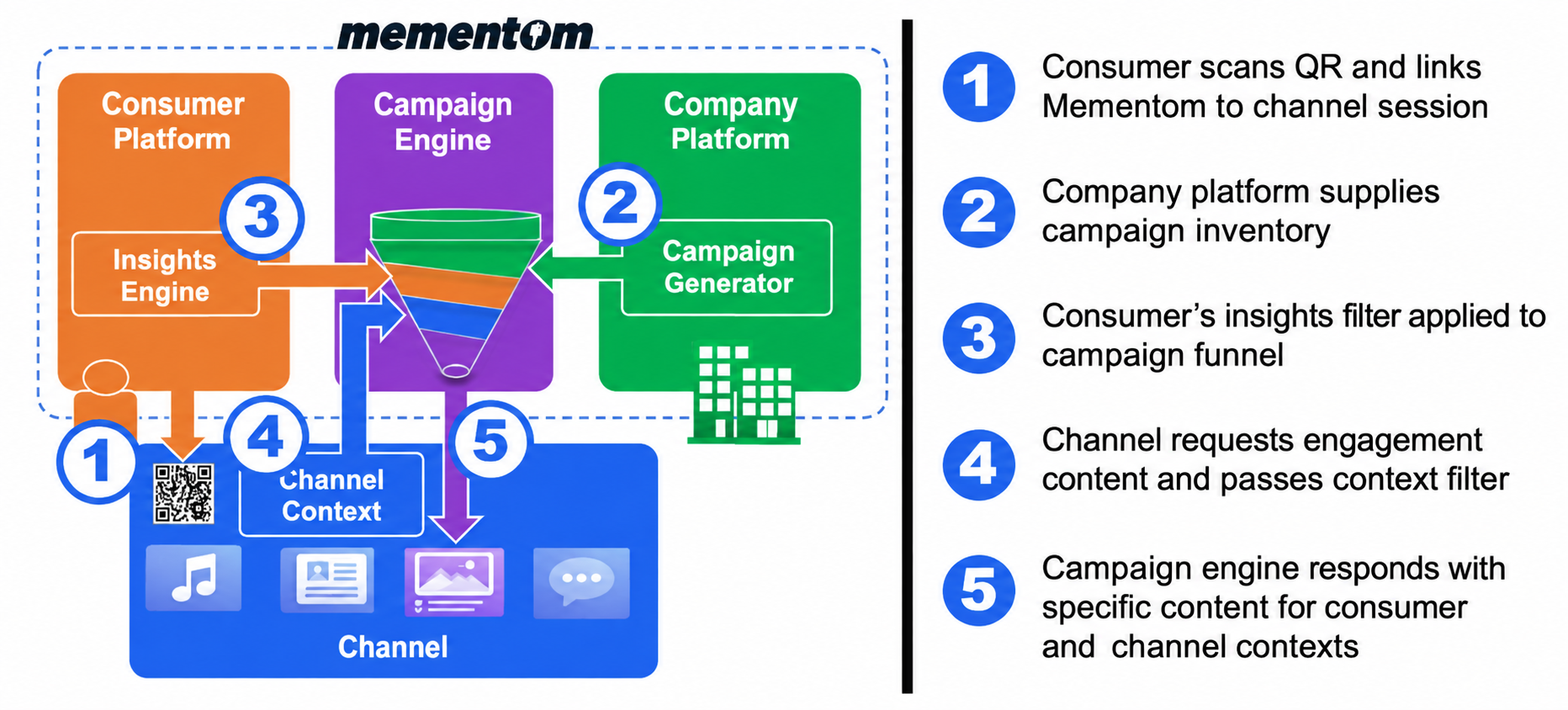
- A person clicks or scans the badge and uses their key to connect to the channel session.
- Companies provide campaigns with audience criteria.
- Mementom matches those campaigns using the person’s permitted insights.
- The channel requests an engagement and supplies context about the current experience.
- Mementom returns relevant content for both the person and that context. The channel presents it; the person decides whether to engage.
What does the channel’s context add?
Relevance depends on what someone is doing now as well as what interests them. A cooking video, a travel article and a conversation with an AI assistant each create a different setting for an offer or question.
The channel supplies context about that setting. Mementom combines it with permitted insights and campaign criteria to choose an appropriate engagement.
Link to this answerWhat can channels deliver?
Channels can present company experiences, personalized offers, deals and coupons, invitations, questions, and interactive activity sessions.
The format should fit the platform and the moment. The person chooses whether to engage; delivery alone does not mean they have agreed to a purchase or to release data.
Link to this answerWhat happens when someone engages, and who gets paid?
For an engagement that takes someone to a company, they arrive in a new session with the context they have agreed to share. The company can use the authorized context for that engagement.
The person and the channel both earn from qualifying paid engagement. Channel earnings come from engagements delivered through that channel, with further opportunities across the network. The person’s approved 50/50 engagement share remains part of Mementom’s model.
Link to this answerDoes it cost anything to integrate as a channel?
No. Channel integration is free, with no upfront integration charge or ongoing platform fee. The channel’s revenue comes from qualifying engagements that people choose to take part in.
Link to this answerHow are channel partners, Anyfluencers and agencies different?
Anyfluencers help bring people and companies into the network. Channel partners provide places where engagements are delivered. Agencies help companies manage their marketing.
A company may have more than one role, but referrals, delivery and permission to manage a company’s account are separate. None automatically grants the others.
Link to this answerHow do we become a channel partner?
Contact partners@mementom.app with your platform, audience and the experience you want to offer. We can discuss the integration and channel revenue-share terms.
Channel partners agree their integration and revenue-share terms with Mementom.
Link to this answerNo matching questions
Try different words, clear the topic filter or choose the other audience.